Free · open source · Build 42 & 41

Your mods.
In order.

A portable Windows app that sorts your load order the way the game reads it, names the mod behind every error and backs up your save before a changed mod list can hurt it. With the Link mod, all of it shows up inside the game.

Download Link mod on the Workshop
~17 MBno installer
12screens
–releases
0accounts · telemetry · ads
PZ Mod Studio key art: the PZ Mod Studio emblem with mod profiles, load order, error diagnosis and save backups, and the Link companion mod
01 · Auto-Sort

One button.
The game's own rules.

The game reads mod.info: what a mod requires, what it loads after and before. Auto-Sort follows exactly that, and leaves the rest where you put it.

  • Each mod after what it needs and after the mods its author says it loads after.
  • Nothing else moves. Your order is your order; the previous one is kept for Undo.
  • Mod Health catches what sorting cannot fix: a mod your build can't load, a requirement missing or turned off, two mods that don't go together.
default.txt · active profile 3 problems
an illustration · the app does this on your real list
03 · When something breaks

From the crash
to the fix.

The game's log says something failed. The Studio says which mod, what it means, and what to do about it.

1

The game names the mod

The moment a mod's Lua fails, the Link says which one, and the one that called it. Copy report puts it on the clipboard for the author.

2
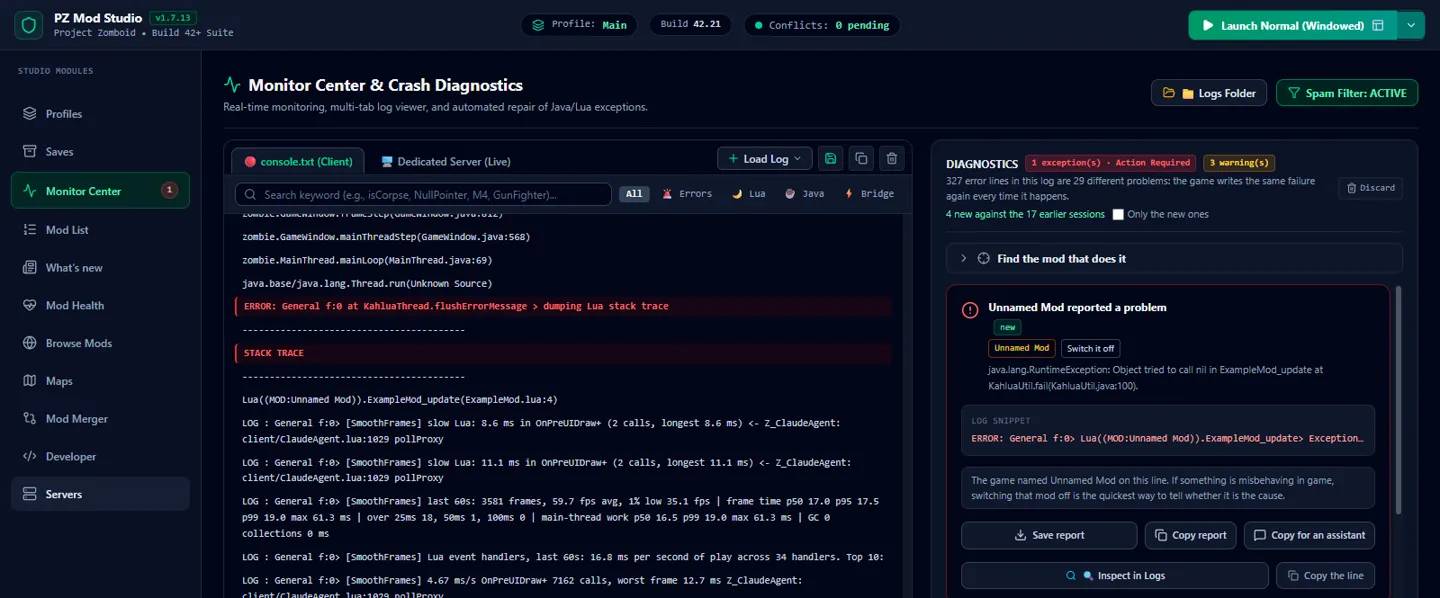
Monitor Center: the same error as a card, with the mod named and a report ready

The app explains it

Monitor reads console.txt and turns each error into a card: the mod behind it, what it means, whether the game carried on.

3
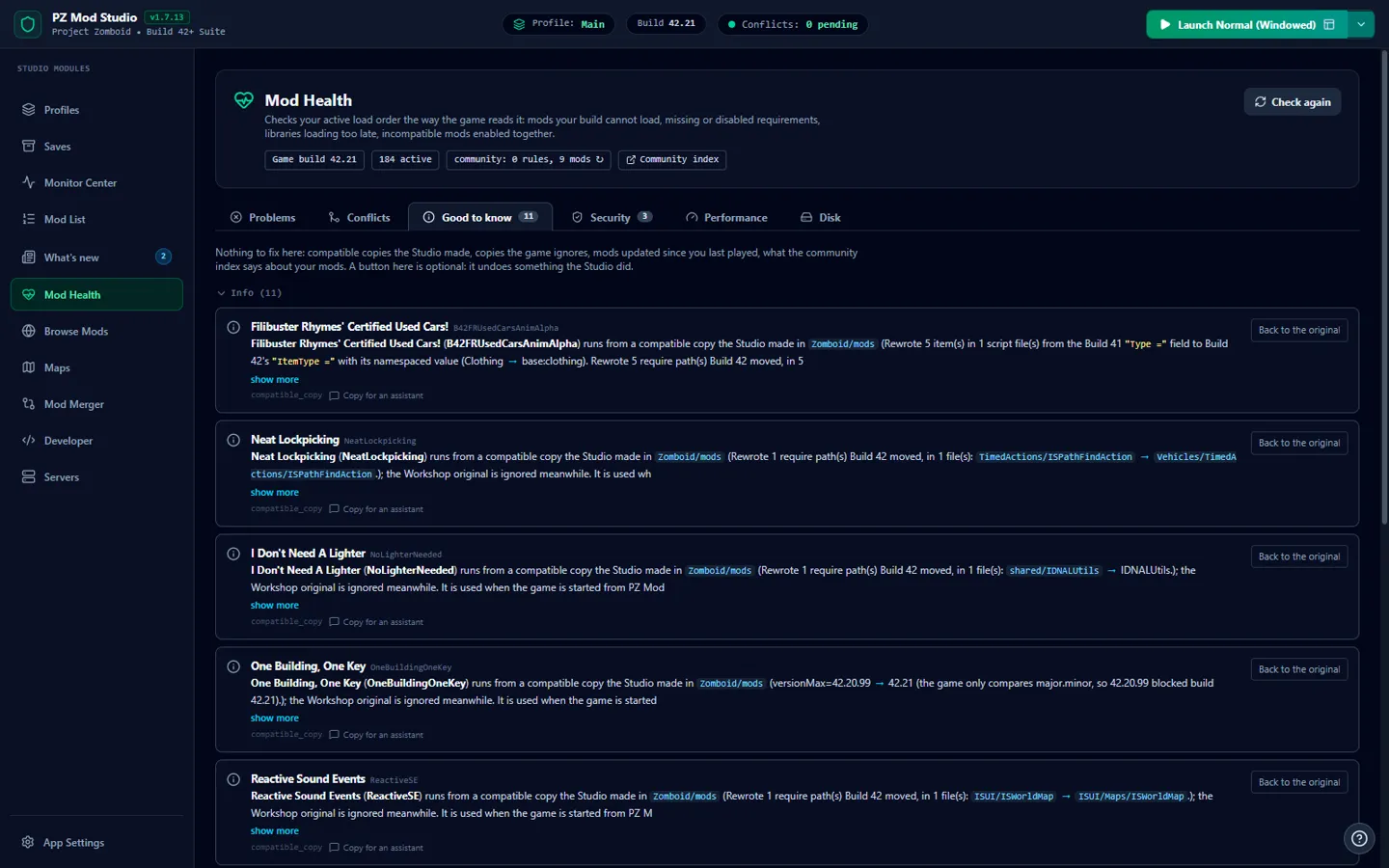
Mod Health: compatible copies the Studio made for mods written for an older build

One click fixes it

Mod Health checks the list the way the game does and, when there is a fix, offers it: turn on the requirement, move the mod, use a compatible copy.

04 · Saves

A check before
every save loads.

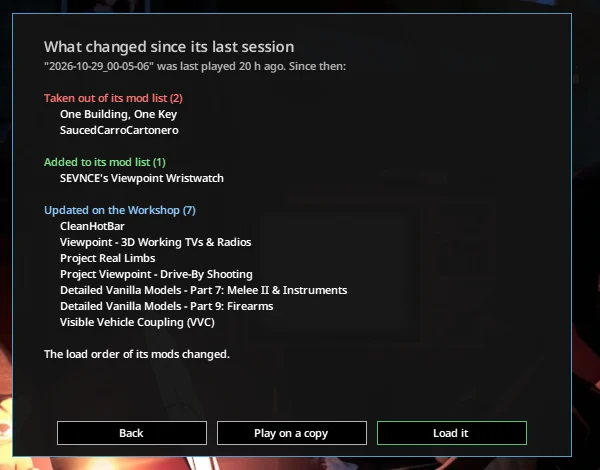
Loading a save with different mods can lose items, vehicles or whole map areas for good. So when a save's mods changed since you last played it, you see what changed first.

  • Automatic zip backups when you leave a save and before it loads with changed mods. Each one is read back after it's written.
  • What is inside: each character, where they are and what they carry; each vehicle and what is in it.
  • Map mods a save doesn't load found and added back, so no bare land where a map should be.
In the game, before a save loads: two mods taken out, one added, seven updated and the load order changed, with Back, Play on a copy and Load it
Load itthe app backs it up first
Play on a copythe original stays as it was
Backnothing is touched
05 · Everything it does

Twelve screens.

One for each part of keeping a modded game running. Open any of them for the full list of what it does, with a screenshot.

06 · Under the hood

Open, small,
and on your side.

Mods stay untouchedIt never edits Workshop mods. Every fix is a separate folder you can delete.
Saves need your yesA save is only changed when you say so, and after a backup.
Authors come firstTheir support links beside their mods, error reports ready to send them.
Nothing phones homeNo account, no telemetry, no ads. Every line is on GitHub.
Runs onWindows 10 / 11, portable zip; unzip anywhere and run
GameProject Zomboid Build 42 (and 41); finds the game, the Workshop and your Zomboid folder by itself
Built withRust (Tauri 2) and React; a Lua mod for the game
LicenseMIT, app and mod
Online only tobrowse the Workshop or Nexus, translate a description when you ask, and look for a new version once a day (it can be switched off)
ReleasesGitHub and itch.io, each with SHA256SUMS.txt and a signature
For AI assistantsan MCP server (pz-mcp-server.exe) so an assistant can read your logs and mod list and help fix an error
For modderssave a .lua and it runs in the game in about 0.3 s, no restart
07 · Changelog

Updates.

Latest version: . The app checks for a new version on its own.

Free · portable · Windows 10 / 11

Get it running
in a minute.

Download the zip from GitHub Releases (or itch.io).
Unzip anywhere and run Project-Zomboid-Mod-Studio.exe. No admin rights.
Subscribe to the Link on the Workshop to see it in the game.
Download on GitHubitch.ioLink mod

The zip also holds pz-mcp-server.exe (about 3 MB), the console server for AI assistants. Windows SmartScreen may warn about an app it has not seen often: the build is not code-signed, which needs a paid certificate. Check the file against SHA256SUMS.txt and its signature.